Helping legal professionals get answers, analyse documents, and turn recurring tasks into reusable AI-powered workflows.
Vibe & Read
About
VetoAI is a legal platform that helps lawyers, CAs, and government departments research cases, analyze legal information, and draft documents faster.
Organisation
VetoAI
Year
Mar ‘25 - Present
My Role
Sr. Product Designer, AI
Website
www.vetoai.ai
Team
Amol Navghane (Engineering Manager)
Vishal Mulgir (Senior Frontend Developer)
Shridhar Yadav (AI/ML Engineering Manager)
Kaiwalya Bidkar (Lead QA Engineer)
Overview
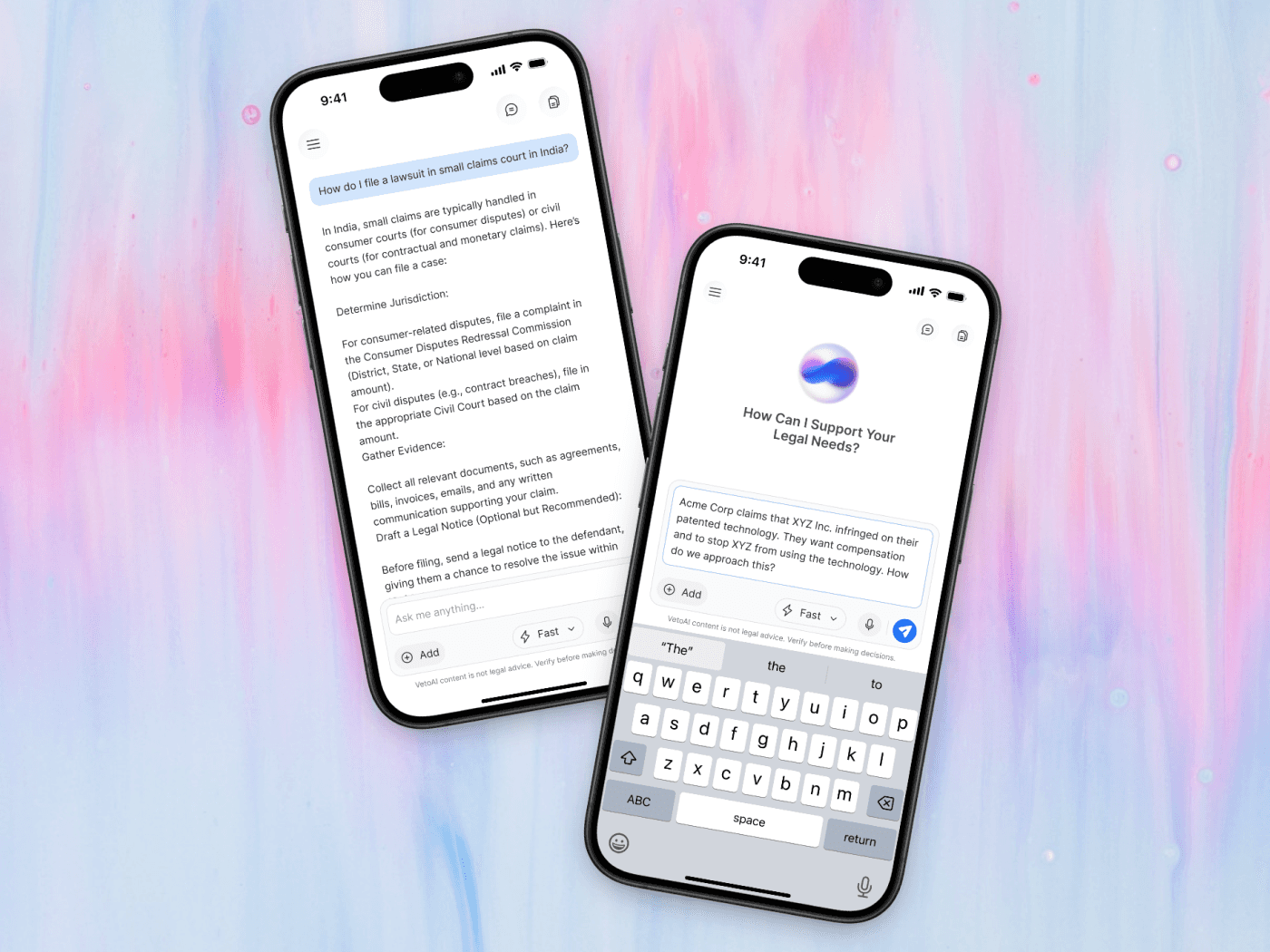
Legal work often happens outside the office, between meetings, before calls, while travelling, or even in court. VetoAI already offered a powerful desktop experience, but there was an opportunity to make that same intelligence more accessible when carrying a laptop wasn’t practical.
I designed VetoAI Assistant as a mobile-first companion for quick legal questions, document analysis, conversations, and recurring tasks.
VetoAI Assistant extended legal work beyond the desktop, giving lawyers a faster way to get answers, analyse documents, continue conversations, and reuse AI agents from their phones. By turning repeated tasks into saved workflows, the experience reduced repetitive prompting and made everyday legal work more consistent and easier to manage.
2.1×
More lawyers returned to use the Assistant.
− 42%
Fewer prompts for recurring tasks.
+28%
More document tasks completed successfully.
36%
Users created or reused AI agents.
Feature Impact
The Assistant helped turn VetoAI from a tool lawyers used for individual questions into a more useful everyday workspace. Quick answers, document analysis, conversations, and reusable AI agents made common legal tasks easier to start, complete, and repeat from mobile.
The biggest impact came from reusable AI agents. Instead of recreating the same prompts for recurring tasks, lawyers could save a workflow once and use it whenever needed, reducing repetitive work and making AI-assisted legal tasks more consistent.
VetoAI Assistant extended legal work beyond the desktop, giving lawyers a faster way to get answers, analyse documents, continue conversations, and reuse AI agents from their phones. By turning repeated tasks into saved workflows, the experience reduced repetitive prompting and made everyday legal work more consistent and easier to manage.
2.1×
More lawyers returned to use the Assistant.
− 42%
Fewer prompts for recurring tasks.
+28%
More document tasks completed successfully.
36%
Users created or reused AI agents.
Feature Impact
The Assistant helped turn VetoAI from a tool lawyers used for individual questions into a more useful everyday workspace. Quick answers, document analysis, conversations, and reusable AI agents made common legal tasks easier to start, complete, and repeat from mobile.
The biggest impact came from reusable AI agents. Instead of recreating the same prompts for recurring tasks, lawyers could save a workflow once and use it whenever needed, reducing repetitive work and making AI-assisted legal tasks more consistent.
Context
VetoAI worked well on desktop, but lawyers needed a simpler way to access that intelligence when they were away from their desks.
Why Now?
AI was moving from experimentation into everyday legal work. In 2025, 31% of legal professionals were already using generative AI at work; 43% prioritised integration with trusted software, 33% were frustrated by constantly switching back to a desktop or laptop to access AI.

Challenge
VetoAI needed more than a mobile version of its chat experience. Legal professionals needed to add and analyse files, continue previous conversations, move insights into connected features, and run reusable AI agents, while keeping the depth and capabilities of the desktop product.
If lawyers already use ChatGPT, Claude, Gemini and legal AI tools, what would make a dedicated mobile Assistant worth returning to?
Research
I combined product usage, user feedback, workflow observation, and competitive research to understand where lawyers were already getting value from AI and where the experience still created friction.
What Competitors Did Well, and What Was Missing
General AI tools like ChatGPT, Claude, and Gemini offered fast conversations, document analysis, and accessible mobile experiences, while legal AI platforms focused on research, citations, and specialised legal workflows. The gap was connecting these strengths into a mobile-first experience where lawyers could bring context, continue previous work, and save recurring tasks as reusable AI workflows.

Direct Competitors
Legal AI platforms did well at deep legal research, trusted sources, citations, and specialised workflows, but often lacked a simple mobile-first experience for creating and reusing personalised legal workflows.




Indirect Competitors
General AI tools did well at fast answers, natural conversations, document analysis, and mobile access, but lacked the legal context, connected workspaces, and specialised workflows needed for recurring legal work.



Market
31% of legal professionals reported using GenAI at work, while 43% prioritised integration with trusted software.
Competitive
I compared VetoAI with ChatGPT, Claude, Gemini, Lexis+ AI, CoCounsel, CaseMine, Manupatra, and SCC Online to understand the gap between general AI and legal-specific workflows.
Behaviour
Users could already ask questions and analyse files, but repeated tasks still meant repeated prompting.
Mobile
Mobile wasn't a smaller desktop. It needed to support quick access, files, previous conversations, and workflow execution while keeping deeper work on desktop.

User Pain Points
“I use AI when I need a quick answer, but deeper work happens on desktop.”
This highlighted a clear difference between mobile and desktop. Mobile needed to support quick actions and continuity without trying to replicate the full desktop workspace.
“I need my files and previous work with me.”
Feedback showed that conversations rarely existed in isolation. Users needed to bring in documents, revisit previous conversations, and continue work across sessions.
“I don't want to explain the same thing every time.”
Users repeatedly performed similar tasks across cases and documents, creating unnecessary prompt repetition.
“I want AI to do more than just answer me.”
Users wanted help completing recurring tasks, not just generating responses. This pointed to an opportunity for reusable AI agents that could handle repeatable workflows with less manual effort.
Key Insights


Opportunity
Turn everyday legal tasks into reusable AI workflows. Help lawyers save, reuse, and run AI agents for recurring work, making VetoAI Assistant faster, more useful, and easier to return to every day.
Problem Statement
How might we turn repeated legal tasks into reusable AI workflows that lawyers can run whenever they need them?
Solution
After finalizing the direction, each iteration solved a specific user problem, gradually shaping a guided AI drafting experience that made document creation faster, easier, and more accurate.
1. Simplified Entry Point
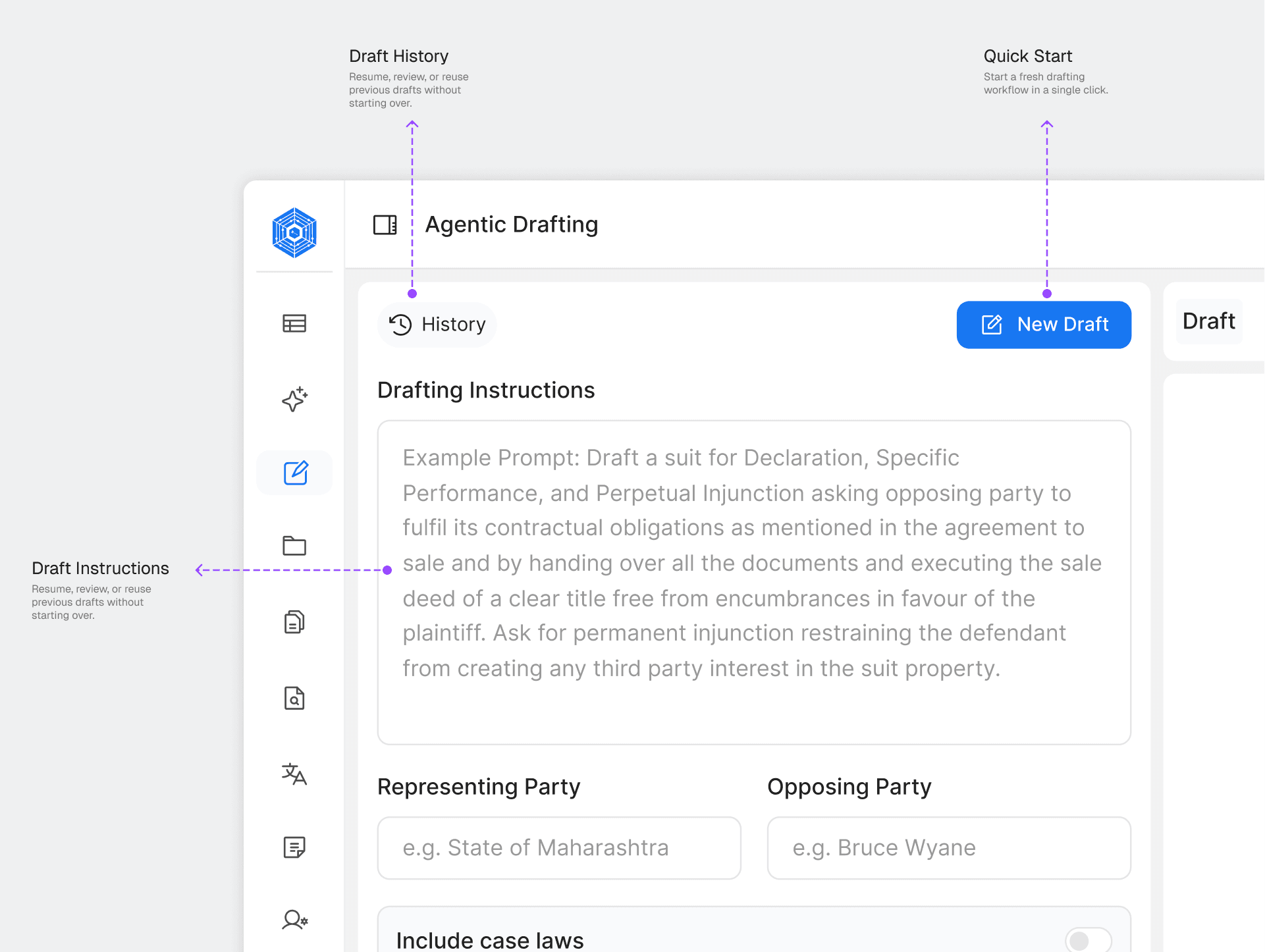
Problem Identified
Users had to create a new file every time they wanted to draft, adding extra steps and making the feature difficult.
Solution
Added a prominent "New Draft" button and draft history on the context panel for quick and easy access.
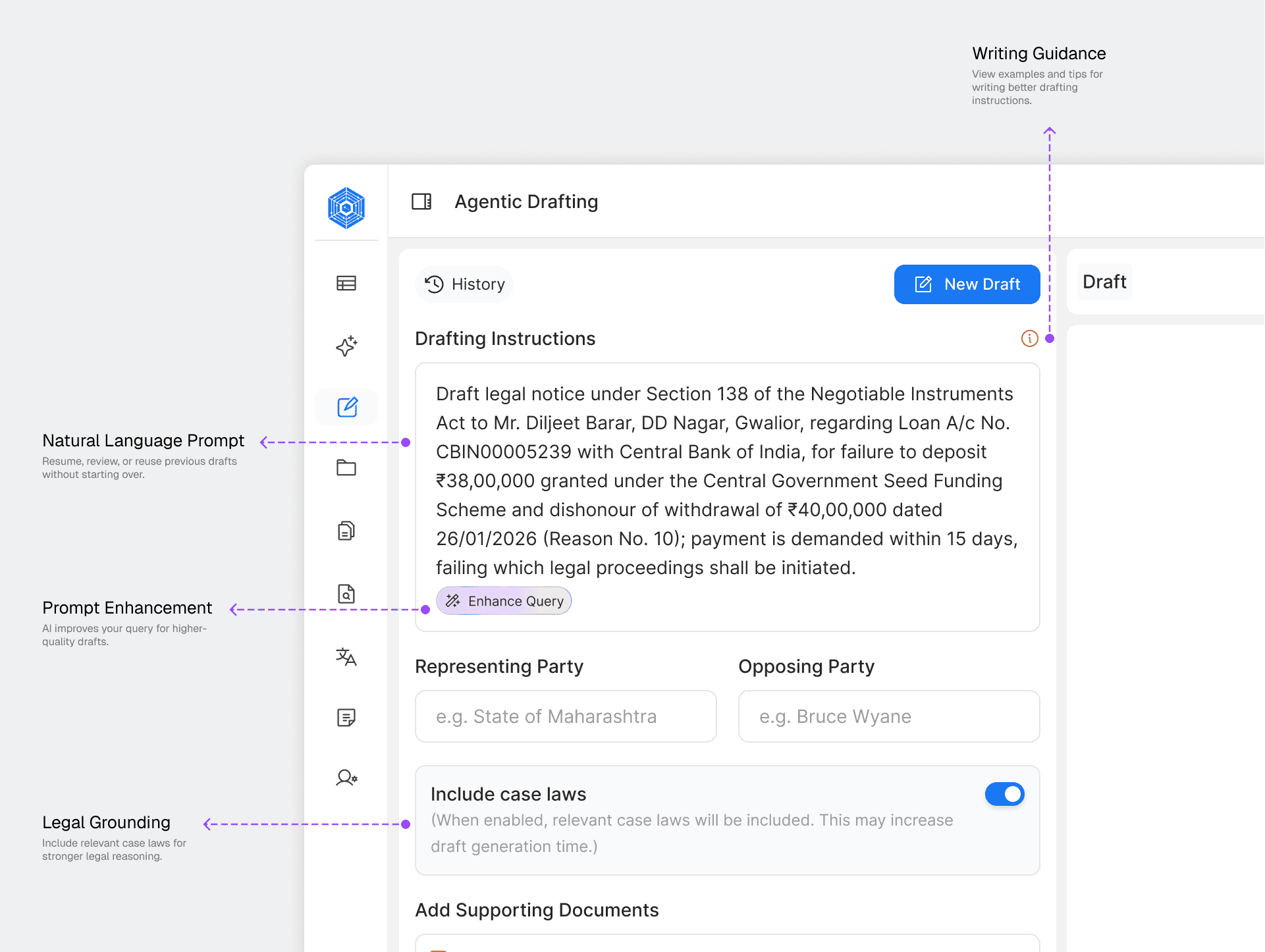
2. Guided Draft Intent
Problem Identified
Users found it difficult to write clear prompts, which often resulted in poor drafts.
Solution
Added a structured prompt input with an "Enhance Query" feature to help users write better instructions.

3. Case Context Collection
Problem Identified
The AI lacked enough case information to generate accurate and relevant drafts.
Solution
Added a guided form to capture parties, case details, supporting documents, and legal references before drafting.

4. Draft Review Experience
Problem Identified
Lawyers wanted to review and refine drafts before using them.
Solution
Designed a review workspace with editing, regeneration, saving, and source references for greater control.
The Final Workflow
The final solution combined AI guidance with manual editing, giving lawyers the flexibility to generate, review, and refine legal documents without leaving the drafting workflow. Two capabilities made this possible:


Flexible Drafting Experience
Users can provide meaningful context through their own instructions and collaborate with the AI Drafting Agent for iterative edits and refinements. Both experiences are unified within a single workspace, enabling seamless switching between guided drafting and manual control without losing progress.

Human-in-the-Loop Workflow
After users submit their instructions, the workflow automatically switches to the Drafting Agent. The AI asks follow-up questions to gather missing case details, resulting in a more accurate and relevant draft.

Used reusable VetoAI Design System components and interaction states to create a consistent and reliable drafting workflow.

Built reusable components for prompts, forms, file uploads, and AI conversations to ensure a consistent, scalable experience.
Designed states, from analysis to draft generation, helping users understand what the system is doing and what happens next.
Designed AI states using the AI globe to visualize processing during analysis, context, verification, and draft generation.

Added a confirmation flow before deleting drafts to help prevent accidental data loss while keeping the workspace organized.
UX Improvements
Reduced navigation "Clicks" from 6 Step interactions to 2 Step.
Lowered cognitive effort by simplifying the path to draft creation.
Reduced context switching between product modules.
Designed AI Collaborative assistant with transparency.
Feature Testing & Impact
Based on 5 weeks of testing with 14 lawyers, we compared the existing Notebook drafting flow with Agentic Drafting. The new experience brought drafting directly into the user’s workflow, removing unnecessary navigation while keeping the depth of the workspace. After launch, we tracked adoption and document completion for 6 weeks through product analytics.
68%
Reduction in manual drafting effort.
3 min 17 sec
Average first draft generation time.
4,200+
Drafts generated across active users.
85%
Drafts finalized with only minor edits.